Coming soonLast hosted in FebruaryWaitlist open

Build a working AI agent in one focused weekend.

Two days in a room. You bring one repeat task you already own. You leave with a first version of it running, a clear way to run it, and a check that tells you when it breaks.

  • Groups of five, so you are never stuck alone
  • Two minutes to apply, no charge to join
  • The waitlist hears about the next date first
DAY 1DAY 2RUNNING

The room

Two days, one room, five people to a table.

Toronto / live cohort / build time

Footage from a past cohort

Why this format

The hard part was never the ideas. It is finishing one.

You have watched the tutorials. You may have started something. It is still not running. Two focused days with help in the room is the shortest path from started to running.

“AI won’t replace humans. But humans who use AI will replace those who don’t.”Sam Altman

Live help when you get blocked

No waiting on forums. No long email threads. Get help right away and keep moving.

Groups of 5 keep you moving

Small groups keep progress visible and scope realistic. You build beside people solving similar tasks.

A scope built to finish

This is a weekend build, not a lecture. You leave with something that works, not just notes.

One loop, run four times.

Every project in the weekend moves through the same four beats. By the fourth pass you are running it without being walked through it.

01PlanName the one task and the shape of a good result.
02BuildWire it end to end while help is standing next to you.
03LaunchPut it somewhere it keeps running after you close the laptop.
04CheckAdd the test that tells you when it quietly stops working.

A working AI helper

Built for your use case, not a toy demo.

A plan to run it

A clear way to run it after the weekend.

A simple check

So it stays reliable as you improve it.

You are not learning AI in general. You are setting up yours.

Most people use AI the way they use a search box: ask, read, close the tab. OpenClaw is the infrastructure behind a personal AI that keeps running after the tab closes. It holds your context, watches your calendar and inbox, and acts on rules you set once.

We set it up with you from scratch during the weekend. You leave with it running on your own machine, not with notes about it.

See what OpenClaw can do

Runs on your own setup

Your data never leaves your infrastructure. No third-party servers, no terms-of-service surprises.

Works across your tools

Calendar, inbox, research, reminders, automations. One system that connects everything you already use.

Always on, not just when you ask

It monitors, acts, and follows up on your behalf. You set the rules once; it runs without you babysitting it.

Yours to own, not rent

Open-source infrastructure. No per-seat fee for the backbone. Build on it, modify it, hand it to someone else.

Taught by someone who ships this work.

Not a presenter reading slides. The person in the room runs these systems for clients during the week.

AR Sajid

The AI Guy · Zero-to-Agent

Started an AI company at 16 instead of finishing high school, and exited it as a founder. Now runs Zero-to-Agent and steps in as fractional head of AI. Sets up the system, trains the team, hands it off.

Chief AI OfficerZero-to-AgentHarness & Agentic Engineer
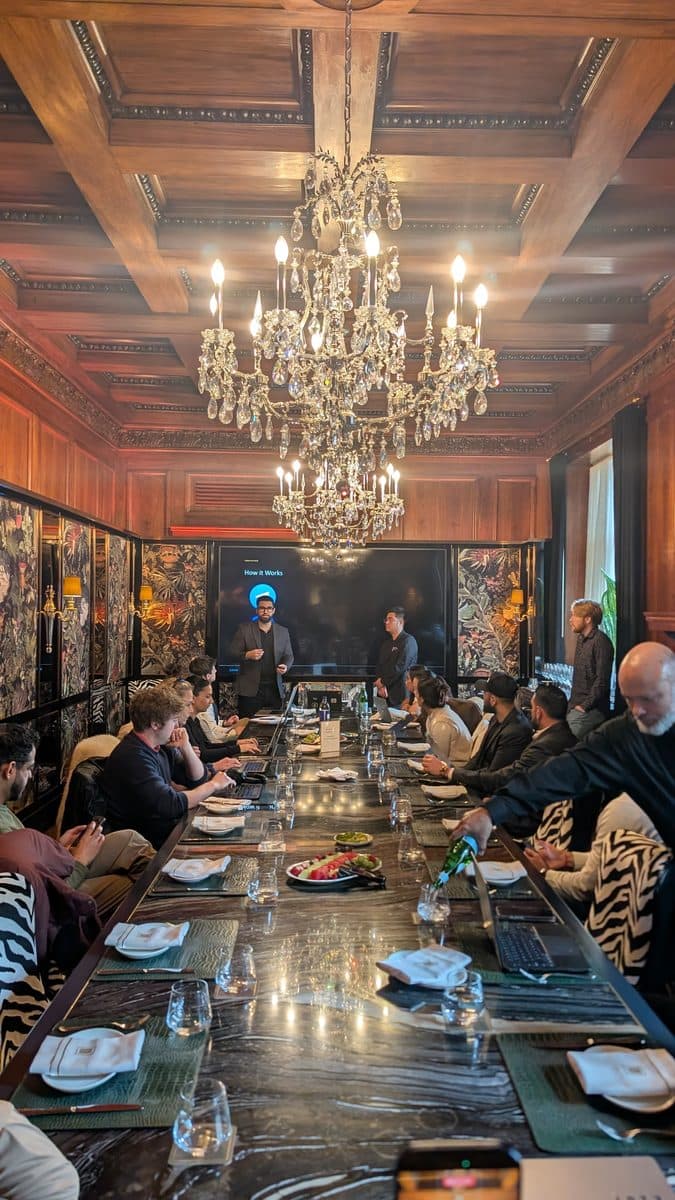
A small group working around a long table at a Zero to Agent session
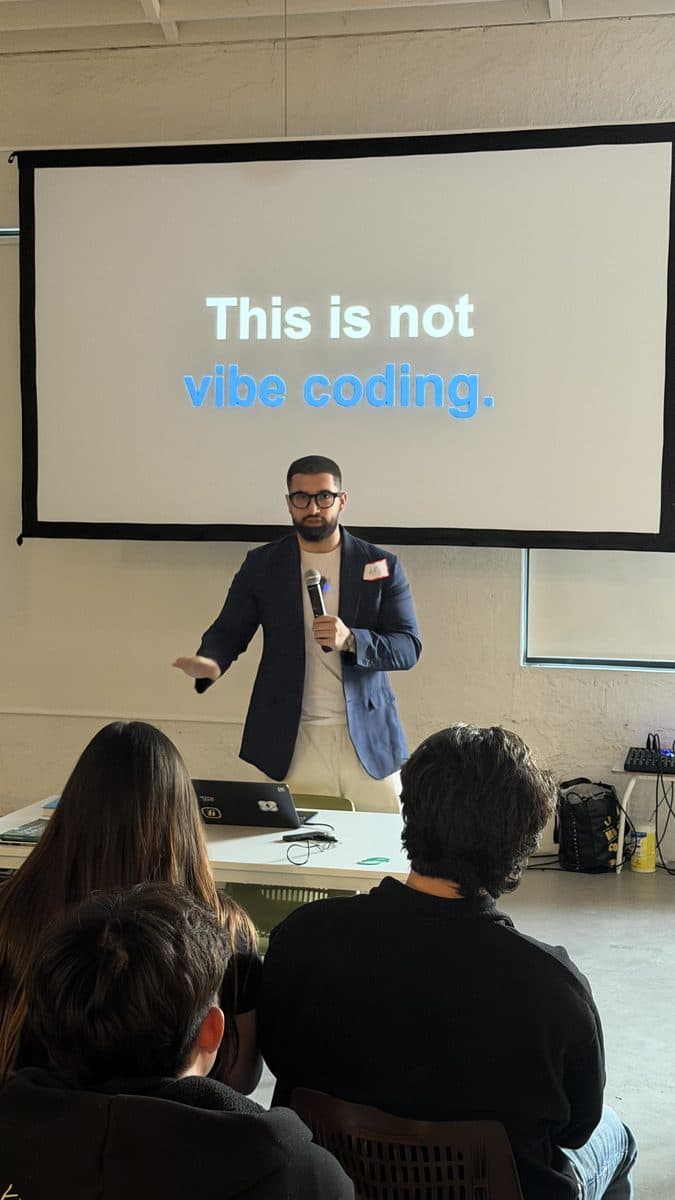
AR Sajid presenting to the room in front of a slide reading This is not vibe coding

How it works

Five steps from applying to demoing what you built.

Two days, about six hours each. Short lessons, long build blocks, a checkpoint at the end of each day.

  1. Apply and join the waitlist

    Fill out the short form so we know your role and the task you want to automate.

  2. Complete short prework

    Pick your task and do a short setup so weekend build time is smooth.

  3. Build in groups of 5 with live help

    Work in a group of 5 with instructor help to finish your first version.

  4. Check in on Day 1

    Confirm your spot at check-in, then spend Day 1 building.

  5. Demo and wrap up

    Show what you built, take the templates home, and leave with a checklist for running it.

The agenda

Four projects across two days.

Setup is deliberately quick so most of the weekend belongs to Project 4, the one you take home running.

Day 1

09:30 - 11:30Project 1: Build a complete app with Lovable
11:30 - 12:15Project 1: job tracker buildout (board, details, dashboard, search)
12:15 - 13:00Lunch
13:00 - 14:00Project 2: chatbot setup (holds a conversation)
14:00 - 15:00Project 2: design the chat flow + build sprint
15:00 - 16:00Project 3: web app setup with Replit + n8n
16:00 - 17:30Project 3 + Project 4: plan + setup
17:30 - 18:00Quick checkpoint + end-of-day recap

Day 2

09:30 - 10:00Day 1 recap + priorities for final build sprint
10:00 - 11:30Project 4: put it online + make it stable
11:30 - 13:00Project 4: add payments + safety checks
13:00 - 13:45Lunch
13:45 - 15:30Project 4: finish the end-to-end demo + basic monitoring
15:30 - 17:00Project 3: finish and polish as needed
17:00 - 18:00Project 4: final testing, live demo, and next steps

Why it matters

The gap this closes is getting to done.

Two focused days, a small group, and help the moment you get stuck. You leave with something that runs.

Questions people ask before booking.

Where things stand

  • Last two cohorts sold out
  • Waitlist open
  • weekend workshop
  • Waitlist contacted first
  • Groups of 5

Best fit if you can

  • Bring one repeat task you own
  • Block two focused days
  • Be comfortable with guided build steps

You can learn the basics for free. You’re paying to finish faster: two focused in-person days, help when you’re stuck, a small group that keeps you moving, and a working demo by Day 2. Most people don’t lack information. They lack a structure that gets them to done.

You don’t need to be a software engineer. You do need to be okay following step-by-step instructions and typing in a code editor (like Cursor or Replit). We provide prework, starter files, and live help in a group of 5 so you’re not stuck alone.

That’s the point of the weekend. You leave with a working first version for your job, a clear way to run it, and a simple way to check it stays correct. We don’t promise promotions. We help you build something real you can keep using.

Fair question. We keep it concrete: a real in-person workshop, a public agenda, named instructors, and a waitlist you can leave at any time. No hype claims and no job guarantees.

The format is short: one weekend, about six hours per day. If you can’t protect two focused days right now, wait for another cohort. If you can, this is the fastest path to a finished first version.

Many employers reimburse training. We provide an invoice and receipt so your finance team can review it quickly.

Because the promise is something that works, not passive watching. In person means faster setup help, quick fixes when you’re stuck, and a small group that keeps you moving. That’s hard to match on Zoom.

Waitlist open

The next cohort fills the same way this one did.

The last two cohorts sold out. Add your name to the waitlist and tell us the task you want to automate. We contact the waitlist first when the next date opens.

Join the waitlist

We reply within 24 hours

Seats that open go to the waitlist first